
VN - AI Video Editor
by Ubiquiti Labs, LLC




About this app
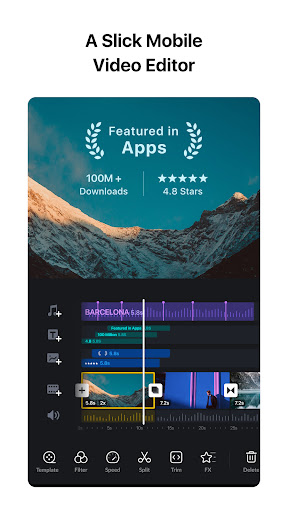
VN Video Editor — short for Video Ninja — is a professional-grade mobile video editing app developed by a team of engineers who wanted to bring desktop-level editing to smartphones without paywalling the experience. While CapCut dominates mindshare among TikTok creators, VN has quietly built a loyal following among filmmakers, vloggers, and anyone who wants precise control rather than quick templates. The app's centerpiece is a multi-track timeline editor that works like a simplified version of Premiere Pro or Final Cut Pro. You stack video, audio, effects, and text layers independently, move them with precision, and export the result with no watermark and no subscription required. Recent updates have added AI-powered features including background removal, auto color grading, and noise reduction, bringing it closer to CapCut's AI capabilities while retaining its reputation for clean, professional output.
Features
- →Multi-Track Timeline — Stack multiple video, audio, and overlay layers on independent tracks. Edit each element separately with frame-level precision, just like desktop video software.
- →Keyframe Animation — Set keyframes on any property — position, scale, opacity, color — to create smooth, professional motion graphics and transitions over time.
- →4K Export, No Watermark — Export in up to 4K resolution at custom frame rates with zero watermark, completely free. No account required, no social login, no strings attached.
- →AI Video Tools — AI background removal, automatic color matching between clips, and intelligent noise reduction for cleaner audio — all integrated into the editing timeline.
Final take
VN Video Editor is the right choice for creators who feel constrained by CapCut's template-first approach and want hands-on control over every cut and transition. The multi-track timeline, keyframe animation, and no-watermark 4K export are genuinely professional features that most apps charge for. It is not as beginner-friendly as CapCut and lacks the breadth of trending templates, but for vloggers, short film makers, and creators who value craft over speed, VN delivers more than its price tag (free) has any right to suggest.
Pros
- ✓No watermark and no subscription — genuinely free professional video editing
- ✓Multi-layer timeline lets you stack video, audio, and effects like a desktop editor
- ✓Keyframe animation gives you precise control over motion and effects
- ✓AI-powered features including background removal and auto color grading
Cons
- ✗Smaller template and effect library compared to CapCut
- ✗Less beginner-friendly — the timeline interface has a learning curve
- ✗AI features can be slow on mid-range devices