Link to Windows
by Microsoft Corporation




About this app
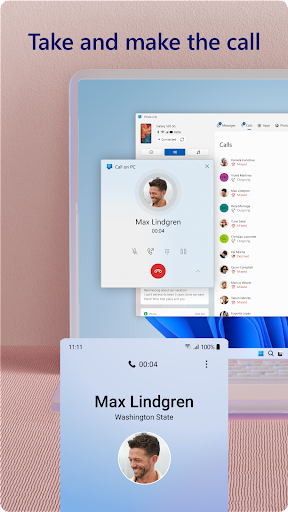
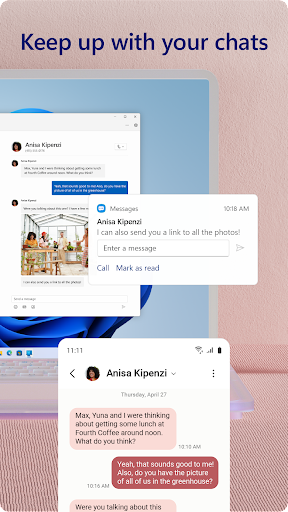
Link to Windows — also known as the Phone Link companion app — is a Microsoft application that enables Android smartphones to connect wirelessly to Windows 10 and Windows 11 PCs, mirroring notifications, messages, photos, and in certain configurations the full Android screen onto the desktop. The app pairs with the Phone Link application pre-installed on modern Windows machines, forming a bridge that lets users interact with their phone's content without physically touching the device. Microsoft originally launched a predecessor called "Your Phone" in 2018 and has continuously expanded its capabilities through deep partnership with Samsung. The central appeal is reducing the cognitive interruption of constantly switching between a computer and a smartphone during the workday. With Link to Windows active, incoming SMS messages and app notifications appear directly in Windows, phone calls can be answered through the PC's microphone and speakers, and photos taken on the phone appear instantly in a Windows gallery accessible from the taskbar. For professionals who spend long hours at a Windows desk, these features genuinely reduce friction and help maintain focus by eliminating the reflex of picking up the phone. The most powerful feature — full Android app streaming and screen mirroring — is where the platform's significant limitation becomes apparent. This capability is reserved exclusively for Samsung Galaxy devices, a restriction that reflects the deep commercial and technical partnership between Microsoft and Samsung rather than a technical impossibility across the wider Android ecosystem. Users with Pixel phones, OnePlus devices, or any non-Samsung Android will find that Link to Windows offers a more basic feature set: notifications, messages, photos, and calls, but no screen mirroring or app streaming. This hard requirement for both a Samsung devices and a Windows PC defines a narrower user base than the app's install count might suggest.
Features
- →Phone Screen Mirroring — Mirror your Samsung Android screen directly onto your Windows desktop and interact with any app using your mouse and keyboard (Samsung devices only).
- →Notifications & Messaging — View, reply to, and dismiss Android notifications and SMS messages from your Windows PC without touching your phone.
- →Instant Photo Sync — Photos taken on your Android phone appear automatically in a Windows gallery within seconds, enabling fast drag-and-drop to any desktop workflow.
- →PC Phone Calls — Answer, make, and manage phone calls directly from your Windows PC using your computer's microphone and speakers.
Final take
Link to Windows is a genuinely useful productivity tool for the specific audience it serves — Samsung Galaxy owners with Windows PCs who want seamless cross-device continuity. Outside that combination, the feature set is more limited and the value proposition less compelling, but within its target use case it works reliably and removes real daily friction.
Pros
- ✓Full Android screen mirroring to Windows PC works without cables, letting you run apps directly from your desktop
- ✓Manage calls, SMS messages, and app notifications from Windows without picking up your phone
- ✓Photo and clipboard sync between Android and Windows PC is near-instant and genuinely reduces friction in daily workflows
Cons
- ✗Full app mirroring and screen control features are limited to Samsung Galaxy devices, locking out users of other Android brands
- ✗Requires both a modern Windows 10/11 PC and a compatible Android device — a niche pairing that limits the potential user base
- ✗Connection can be unreliable on some network configurations, occasionally dropping and requiring re-pairing